The first 10 seconds of a customer phone call will either build trust or destroy it.
When a customer dials your number, they are already investing their time. If they are met with an endless loop of robotic prompts, dead ends, or a dial tone, that frustration immediately attaches itself to your brand. But if they are seamlessly routed to the exact person or department that can solve their problem, you’ve quietly demonstrated competence.
This is where Interactive Voice Response (IVR) comes in.
For decades, IVR has been the backbone of business telecommunications. It is the automated system that greets callers, presents them with a menu of options, and routes their call based on their inputs. But modern IVR is no longer just “Press 1 for Sales, Press 2 for Support.” It is a dynamic routing engine that, when paired correctly with live answering services, can drastically reduce your operational costs while actually improving the customer experience.
If you are setting up a call center, upgrading your business phone system, or looking to partner with a 24/7 live answering service like Answer United, understanding the mechanics, economics, and psychology of IVR is mandatory.
This comprehensive guide will break down exactly how IVR works, the hard industry data on what it costs (and saves), the fatal design flaws most companies make, and how to build a hybrid system that leverages automation without losing the human touch.
What is Interactive Voice Response (IVR)?
At its core, IVR is an automated telephony system that interacts with callers, gathers basic information, and routes the call to the appropriate recipient or self-service module.
Instead of a human receptionist answering every single inbound call and manually transferring it, the IVR acts as the digital gatekeeper. It handles the initial triage.
When a caller connects to an IVR system, they hear a pre-recorded or dynamically generated voice menu. They interact with this menu using one of two methods:
- DTMF (Dual-Tone Multi-Frequency): The traditional touch-tone input. The caller presses a number on their keypad, which sends a specific audio frequency to the system, triggering a routing rule.
- Speech Recognition / Conversational AI: The caller speaks their request aloud (“I need help with my billing statement”), and Natural Language Processing (NLP) interprets the intent and routes the call accordingly.
The Ecosystem: IVR vs. ACD vs. PBX
To understand IVR, you have to understand where it sits in the telecommunications stack. People often confuse IVR with other acronyms, but they all serve distinct functions:
- PBX (Private Branch Exchange): This is your actual phone network. It allows internal extensions to talk to one another and connects your internal network to the outside public switched telephone network.
- ACD (Automatic Call Distributor): The routing logic. Once the IVR figures out why a customer is calling, the ACD figures out who they should talk to based on agent availability, skills, and current queue lengths.
- IVR: The front-end interface. The IVR talks to the customer, gathers the intent, and hands the data to the ACD.
The Economics of IVR: Why Businesses Rely on It
The primary driver behind IVR adoption is cost compression. Handling a phone call with a live human agent is expensive. It requires wages, benefits, software licenses, and training.
Recent industry benchmarking data reveals a stark contrast in the unit economics of customer support. The median cost for a human-assisted contact in a call center is $13.50. By contrast, a fully automated, self-service resolution through an IVR or bot costs roughly $1.84.
If your business receives 10,000 calls a month, shifting just 20% of those calls to self-service IVR (like checking an account balance or confirming business hours) removes $23,320 in live-agent costs every single month.
The strategic takeaway: IVR is not meant to replace your human agents; it is meant to protect their time. By filtering out repetitive, low-value inquiries, you reserve your expensive human talent (and your outsourced virtual receptionist teams) for complex problem-solving and high-touch customer service.
Core Call Center Benchmarks You Need to Know
If you are implementing an IVR, you need to measure its impact against industry standards. A poorly designed IVR will ruin your metrics, specifically your abandonment rate and First Call Resolution (FCR).
Here is a breakdown of median call center KPIs across major industries:
| Industry | Customer Satisfaction (CSAT) | First Call Resolution (FCR) | Average Handle Time (AHT) | Cost per Contact |
|---|---|---|---|---|
| Government / Nonprofit | 94% | 80% | 5.0 min | $4.25 |
| Healthcare / Life Sciences | 90% | 89% | 6.0 min | $6.90 |
| Insurance | 90% | 84% | 7.0 min | $11.00 |
| Retail and Consumer | 89% | 83% | 7.0 min | $5.00 |
| Technology | 89% | 75% | 15.0 min | $10.00 |
| Financial Services | 85% | 85% | 8.0 min | $7.30 |
First Call Resolution (FCR): The Metric That Matters Most
FCR measures whether a customer’s issue is fully resolved in a single interaction—no transfers, no callbacks, and no repeat explanations.
The industry benchmark for FCR sits between 70% and 85%. FCR is arguably the single most important metric in telecommunications because it correlates directly with both operational costs and customer loyalty. Every repeat contact erodes satisfaction and doubles your cost.
How IVR impacts FCR:
A well-designed IVR boosts FCR by accurately routing the caller to the department with the right expertise the first time. A poorly designed IVR destroys FCR by misrouting calls, forcing agents to blindly transfer frustrated customers back into the queue.
The Dark Side of IVR: Why Callers Hate Bad Menus
Despite the financial benefits, IVR has a massive PR problem. Consumers routinely rank navigating automated phone menus as one of their top customer service frustrations.
If your abandonment rate (the percentage of callers who hang up before reaching an agent) spikes above the healthy range of 2% to 5%, your IVR is likely the culprit.
Common IVR design failures include:
- The “Endless Loop”: Callers are forced through five levels of sub-menus without ever being offered a path to a live human.
- Irrelevant Options: Forcing a caller to listen to a 30-second explanation of your website’s FAQ before allowing them to press a button.
- The “Listen Carefully as Our Options Have Changed” Lie: Businesses use this phrasing for years without changing their options, training callers to ignore instructions.
- Voice Recognition Nightmares: Systems that fail to understand accents, background noise, or colloquial phrasing, repeatedly saying, “I’m sorry, I didn’t catch that.”
When an IVR creates friction, the customer’s instinct is to “zero out”—pressing ‘0’ repeatedly or yelling “Representative!” into the phone. If your system blocks this, the customer hangs up. If they are a prospect, you just lost a sale. If they are a current client, you just increased your churn risk.
The Hybrid Approach: Why Answer United Wins
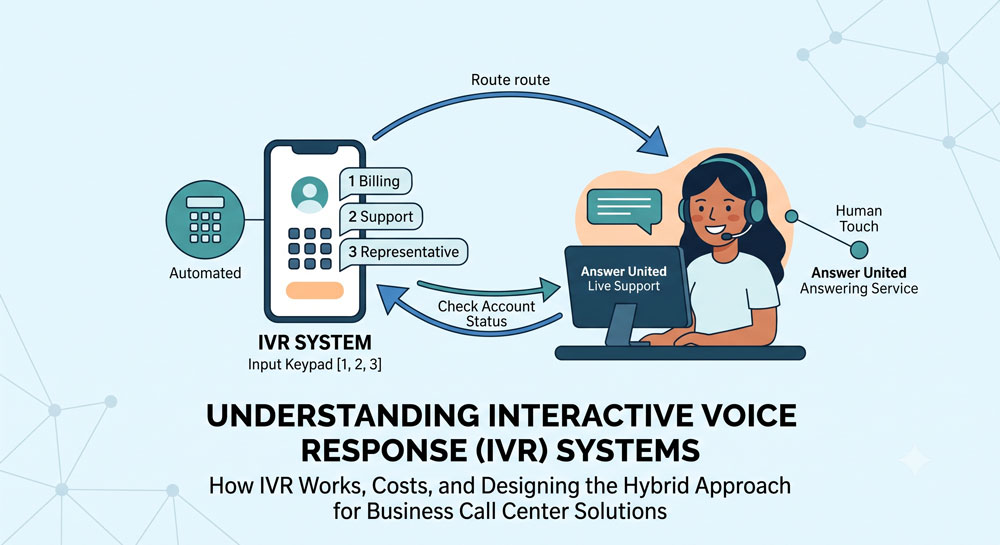
Because of the limitations of pure automation, the most effective business communication strategy today is a hybrid model: leveraging an IVR for initial intake and self-service, backed by a 24/7 live answering service.
This is the exact operational model Answer United has perfected over 60+ years in the industry.
Instead of forcing complex issues into a rigid robotic menu, a hybrid setup operates dynamically:
- Business Hours Routing: The IVR handles the initial greeting. If a caller wants business hours or location details, a recorded prompt answers them. If they have a complex issue, the IVR routes them to your in-house staff.
- After-Hours & Overflow Support: When your office closes, the IVR automatically shifts routing rules. Instead of sending high-value clients to voicemail, calls forward seamlessly to Answer United’s 100% US-based call center.
- Emergency Dispatch: For property management or medical industries, the IVR can identify emergency inputs (e.g., “Press 1 for medical emergencies”) and immediately patch the caller through to a live Answer United agent who uses a customized script to dispatch help.
With a hybrid system, you get the cost-efficiency of automated routing without ever sacrificing the empathy and problem-solving capability of a real human being.
Blueprint: How to Design the Perfect IVR Menu
Building an IVR is not an IT task; it is a customer experience task. You have to map the journey before you record a single audio file. Follow these critical steps:
- Audit Your Call Data: Before deciding on your menu options, pull your ACD or CRM data to identify why people actually call you. What are the top 3-5 reasons? Your IVR should only address these dominant intents.
- Map the Call Flow Visually: Draw a flowchart. Start with the main greeting, branch out into the primary options, and trace every single path to its final destination (a specific agent group, a self-service module, or an external answering service). Ensure there are no dead ends.
- Write the Script for the Ear, Not the Eye: Spoken language is different from written language. Keep prompts short. State the action before the number so callers know what to listen for (e.g., “To speak with billing, press 2” instead of “Press 2 for billing”).
- Implement the Escape Hatch: Always provide a clear, accessible path to a live human agent. Whether it is pressing ‘0’ or saying “Agent,” trapping a caller in an automated loop will spike your abandonment rate.
- Record with a Professional Voice: Do not have your office manager record the prompts on their smartphone. Use a professional voice actor or high-fidelity Text-to-Speech (TTS) software. The audio quality sets the tone for your brand’s professionalism.
Top IVR Use Cases by Industry
A standard IVR setup does not work for every business type. How you structure your routing depends entirely on what your customers expect when they dial your number.
1. Healthcare & Medical Practices
In healthcare, the stakes are high, and compliance is mandatory. A medical IVR must prioritize triage and emergency escalation.
- Typical Flow: “If this is a medical emergency, hang up and dial 911. For scheduling, press 1. For prescription refills, press 2. To reach the on-call physician, press 3.”
- The Answer United Advantage: If a patient presses ‘3’ at 2:00 AM, the IVR forwards the call to Answer United’s HIPAA-compliant medical answering agents, who securely dispatch the message to the on-call doctor.
2. Property Management & Real Estate
Property managers juggle leasing inquiries, maintenance emergencies, and vendor coordination.
- Typical Flow: “For leasing information, press 1. For non-urgent maintenance, press 2. For an after-hours maintenance emergency, press 3.”
- The Answer United Advantage: By filtering out the non-urgent requests to a voicemail or ticketing system, our property management answering service only intervenes for true emergencies (like a burst pipe), saving the property manager from unnecessary wake-up calls.
3. E-commerce & Retail
Retail call centers deal with massive volume spikes around holidays and product launches. Retail has a CSAT benchmark of roughly 89%, meaning consumers expect fast, frictionless service.
- Typical Flow: “To check the status of an order, press 1. For returns, press 2.”
- Automation: E-commerce IVRs are heavily integrated with backend CRMs. A caller inputs their order number via keypad, and the IVR dips into the database to read back the shipping status using text-to-speech—completely avoiding a live agent.
4. Technology & SaaS
Tech support calls are complex and time-consuming. Technology call centers have the longest average handle time (AHT) of any industry at 15.0 minutes.
- Typical Flow: “For billing, press 1. For technical support, press 2.”
- Smart Routing: A SaaS IVR will often ask for a customer ID. If the CRM identifies the caller as an Enterprise/VIP tier client, the ACD immediately pushes them to the front of the queue, bypassing standard hold times.
Measuring IVR Success: Which Metrics to Track
Once your IVR is live, you cannot simply set it and forget it. You must continuously monitor the telemetry data to ensure it is actually helping your business.
Focus on these core performance indicators:
- Containment Rate: The percentage of callers who successfully complete their intent entirely within the IVR (e.g., paying a bill) without ever speaking to an agent. High containment equals massive cost savings.
- Abandonment Rate: The percentage of callers who hang up while navigating the menu. If this exceeds 5%, your menu is too complex.
- Zero-Out Rate: How frequently callers press ‘0’ to bypass the menu. A high zero-out rate usually means your menu options do not align with the actual reasons people are calling.
- Misroute Rate: How often agents have to transfer a call because the IVR sent it to the wrong department. This is a primary killer of First Call Resolution.
Frequently Asked Questions (FAQ)
What is the difference between an auto-attendant and an IVR?
An auto-attendant is a basic routing tool—it plays a greeting and offers a static menu (Press 1 for Sales, 2 for Support). An IVR is dynamic; it can interact with backend databases, process payments, verify accounts using speech recognition, and perform self-service tasks without human intervention.
How much does an IVR system cost?
The cost varies heavily based on deployment. Cloud-based IVR is typically included in UCaaS (Unified Communications as a Service) platforms which charge a monthly per-user license fee (often $20–$50/user). Enterprise, AI-driven IVRs with CRM integrations require custom development and can cost thousands of dollars in setup fees.
Can an IVR replace my receptionist?
It can replace the routing function of a receptionist, but it cannot replace the empathy, problem-solving, and relationship-building a human provides. This is why pairing an IVR with a live service like Answer United is the ideal setup for growing businesses.
What is Conversational IVR?
Conversational IVR uses advanced Natural Language Understanding (NLU). Instead of pressing buttons, the system asks, “How can I help you today?” and allows the caller to speak naturally. The AI parses the sentence, identifies the intent, and routes the call.
How do I handle callers who refuse to use the IVR?
You will always have callers who refuse automation. Your IVR must be programmed with a timeout rule: if a caller does not press a button or speak for 5-10 seconds, the system should automatically forward them to a default live queue or an answering service agent.
Will an IVR work for small businesses?
Absolutely. While large call centers use IVR to save millions in labor, small businesses use it to project a professional, enterprise-level image. A well-crafted greeting gives a polished first impression, even if all paths eventually lead to the same small team or your outsourced support center.
The Bottom Line
Interactive Voice Response is a vital operational tool, but technology alone is rarely the complete answer. The businesses that dominate their markets in customer satisfaction are the ones that know exactly when to automate and when to rely on an empathetic human voice.
A perfectly engineered IVR can slash your overhead and route calls efficiently, but what happens when a customer needs immediate help, experiences an emergency, or calls after hours? That is where the automation ends and true customer service begins.
At Answer United, we provide the ultimate safety net for your communication stack. Our 100% US-based, highly trained agents seamlessly integrate with your existing IVR, ensuring that every escalated call, after-hours inquiry, and complex problem is met with a professional, human response. We don’t just take messages; we act as a seamless extension of your brand, 24/7/365.
Stop letting frustrating automated loops cost you customers. Upgrade your customer experience with a hybrid approach that combines the efficiency of smart routing with the warmth and problem-solving capability of a real person.
Ready to transform your call center and stop missing valuable opportunities? Contact Answer United today to build a customized answering solution that fits your exact business needs.